
Request to Skip a Payment
Having extra cash during the summer vacation season can go a long way. Since you have an excellent payment history, here’s an exclusive offer just for you. During the months of June or July, you may skip one payment on each of your qualifying Keesler Federal loans for a low payment deferral fee of $29 per loan.*


Setting up Skip a Pay when you have an existing recurring automatic payment transfer
If you wish to take advantage of the Skip a Payment option, but already have an automatic transfer set up to pay your loan each month, you must take additional steps to suspend/cancel the transfer. If action is not taken, your automatic transfer will take place and payment will not be skipped even if you have selected the skip a pay option.
For detailed instructions, please select the type of automatic payment you currently have (OR: that applies to you):
Option 1: Automatic Transfers
Scenario: I have set up an automatic transfer within the Keesler Federal online and mobile banking system to pay my loan from my checking account, savings account or a non-Keesler Federal financial institution.
- Log in to your Keesler Federal account from online or mobile banking
- Under the Transfer & Pay menu item select Make a Transfer
- Select the SCHEDULED tab to display your Scheduled Transfers
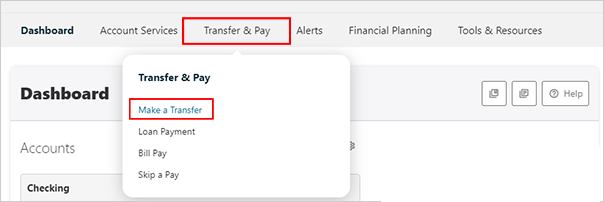
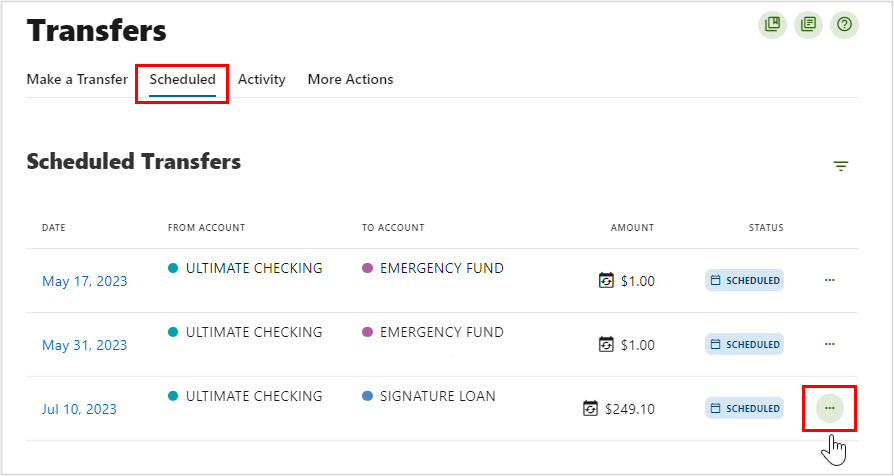
- Locate the scheduled transfer/payment you wish to skip
- Click on the ellipsis (“…”) to the right of the transfer/payment
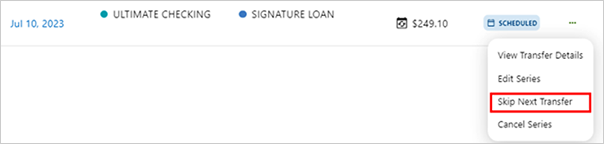
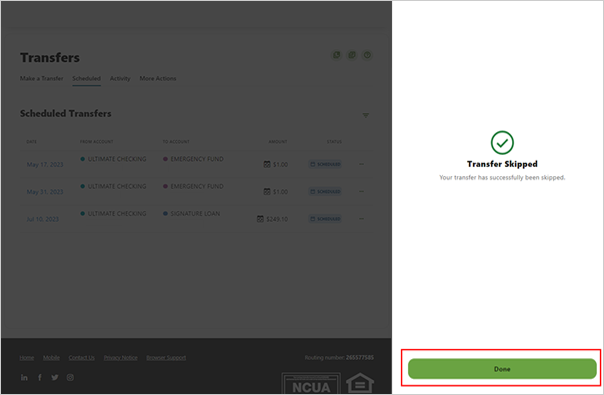
- In the ellipsis (“…”) dropdown, choose “Skip Next Transfer”
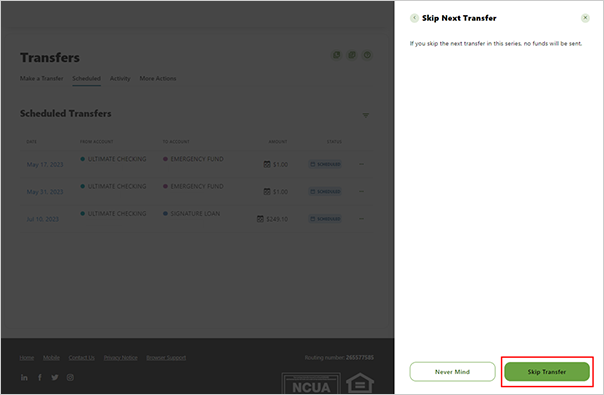
- When the “Skip Next Transfer” window opens, click “Skip Transfer” at the bottom
- Hit Done to review next transfer date
Option 2: Payment Portal
Scenario: I have set up a recurring loan payment from another financial institution through the Keesler Federal Payment Portal.
- Log in to the Payment Portal
- Click on Manage AutoPay
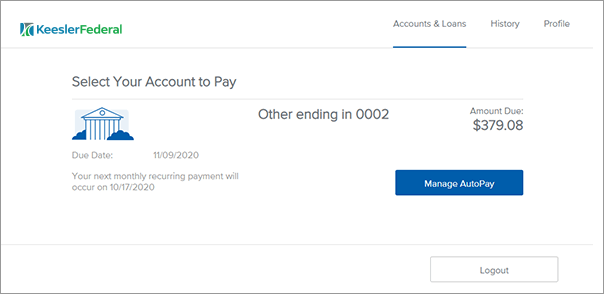
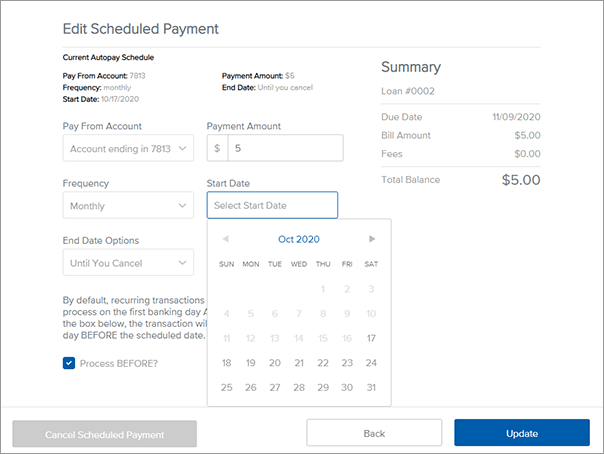
- Edit the Start Date field to the date of next desired payment and click Update. Alternatively, you can click on Cancel Scheduled Payment to cancel the scheduled payment altogether.
- You will get an email to the Payment Portal registered email confirming the changes.
Option 3: ACH Transfer
Scenario: I have set up an external recurring automatic ACH transfer to pay my Keesler Federal loan from a non-Keesler Federal financial institution or other payer (payroll or Social Security direct deposit, etc.).
If your loan payment is made via Payroll Deduction, Direct Deposit, or Electronic Funds Transfer (EFT)/Automated Clearing House Records (ACH) and applied directly to your loan, you will need to contact your payroll department or financial institution to “suspend” the deduction from your payroll or account for the month you wish to skip a payment.
Transfers From a Mobile Device
Instructions: 1. Navigate to the Transfers menu item.

2. Tap on the Scheduled Transfers to view list
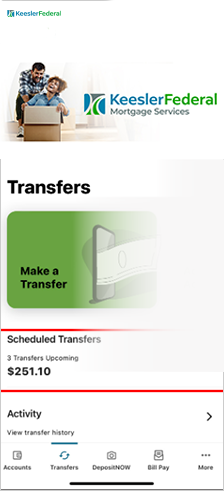
3. Select the transfer/payment you would like to skip
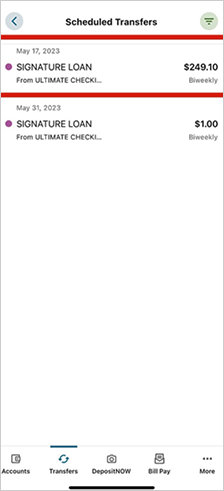
4. Next to the Next Transfer date, click “Skip Next Transfer”
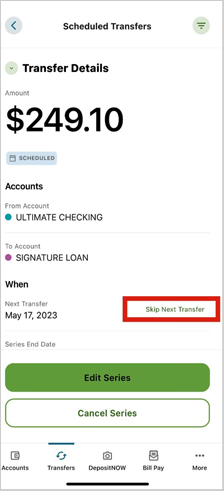
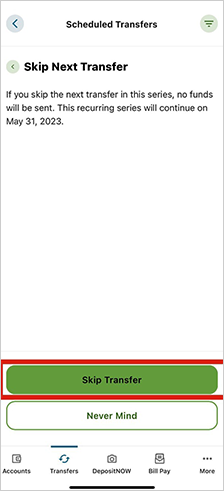
5. Then click Skip Transfer button
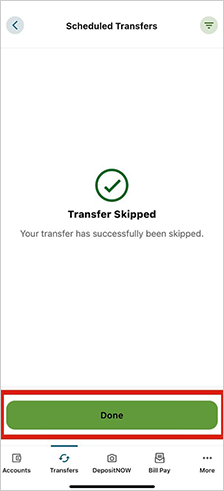
5. Click Done to review update scheduled transfer detail
Important Information
Keesler Federal Credit Union assumes no responsibility for lost or missing requests.
It is the member’s responsibility to verify that the request has been processed.
Keesler Federal Credit Union reserves the right to restrict Skip a Pay. If denied, the credit union will contact you.
Interest will continue to accumulate on your loan during the month you skip your payment.
The term of your loan may be extended if a payment is skipped. An Extension of Terms may impact insurance products purchased from third parties.
If you have scheduled an automatic payment from your Keesler Federal account to your loan, you will need to log in to your online banking account and skip the next recurring payment.
If your loan payment is made via Payroll Deduction, Direct Deposit, or Electronic Funds Transfer (EFT)/Automated Clearing House Records (ACH) that applies directly to your loan, you will need to contact your payroll department or financial institution to “suspend” the deduction from your payroll or account for the month you wish to skip a payment.
If your payment is electronically transferred to Keesler Federal from another institution and applied directly to your loan, you must process the Skip a Payat least 7 business days before your payment transfer date to ensure that the electronic transfer is suspended for the month in which you wish to skip the payment.
If the Skip a Pay request is made by phone, through online or mobile banking secured messaging, or in a branch, please allow up to two weeks for processing.
Other options for requesting to Skip a Pay are available for $29 per loan skipped: in person at any Keesler Federal branch, call the Member Contact Center at (888) 533-7537, or through your online banking secure Message Center.
Account Numbers
Member Account Information
Most JFFCU account numbers will stay the same and automatically transfer to Keesler Federal—no action is required for most members. However, some JFFCU members will receive new Keesler Federal account numbers starting March 2, 2026, due to differences in account number formats.
If your account is affected, you will receive detailed instructions by mail and email before March 2, 2026, explaining how to update your account information, direct deposits, and electronic transfers.
For more information regarding your specific circumstances, please refer to the sections outlined below.

Consumer Loans
Auto, Boat, RV, ATV, BUS or Personal Loans
All current loans on file with JFFCU will be transferred to Keesler Federal when the account/data transfer is complete. You will have access to those accounts via your online banking access.
JFFCU members will need to sign in to online banking at Keesler Federal - www.kfcu.org by selecting the LOGIN button. You can use your same JFFCU username, BUT it will prompt you to select a password.
Once you are logged in, it will look VERY similar to the JFFCU platform you were familiar with.

Business Banking
Business Loans
The business lending team at Jefferson Financial FCU you’ve worked with in the past are still available to assist with any of your questions.
Please contact them directly at 1-888-533-7537 or via email; they would be happy to assist
- Zach Vandergriff at Zach.Vandergriff@kfcu.org
- Rob Bell at Robert.Bell@kfcu.org

Member Services
Contact Us?
You can reach our Member Contact Center Monday through Friday, 7:00 a.m. to 7:00 p.m.,
or Saturday, 8:00 a.m. to 1:00 p.m, Central.